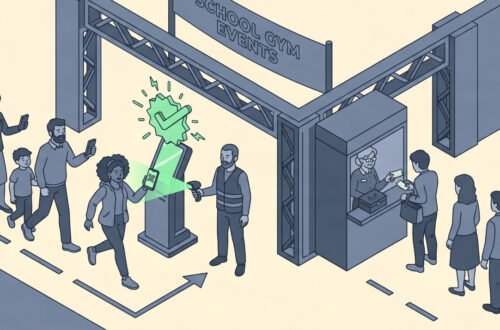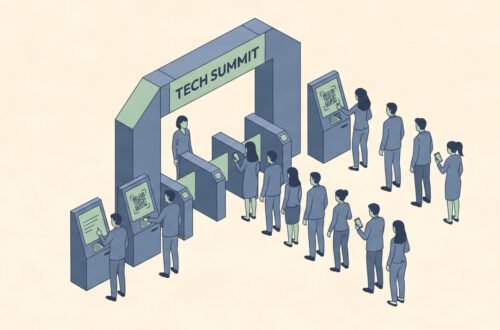

Long entry lines ruin an event before it even begins. You spend months planning logistics, booking talent, and securing permits, only to watch attendees bake in the sun while staff manually rip paper tickets. Paper tickets get lost easily in pockets or purses. Counterfeiters duplicate physical passes with alarming speed. Cash boxes create massive security nightmares at the front gate.
Digital ticketing solves these logistical headaches entirely. A digital ticket lives directly on a smartphone as a secure QR code or encrypted NFC pass. It cannot be easily copied by fraudsters. Your laser scanners read these codes in milliseconds. Your central dashboard updates attendance counts instantly across the venue.
This guide covers everything you need to implement a modern ticketing operation from scratch. You will learn the exact hardware requirements, crucial software settings, and necessary staff training protocols. We detail the precise steps to transition away from physical box offices permanently. Expect this full transition to take about three weeks of careful planning before your first live scan. By the time your gates open, you will maintain complete control over venue capacity and fraud prevention. Let’s look at the infrastructure you need to start operating professionally.
Overview
This implementation replaces legacy paper systems with a highly secure, fully digital entry protocol. You will set up an online payment gateway, configure scanning hardware, and train gate staff. The planning phase takes roughly three weeks. Procurement of rental scanners takes one week of lead time. Staff training requires two dedicated afternoon sessions to ensure proficiency.
You need one technical project lead for the software configuration. You also need one experienced gate manager to oversee the physical scanning stations during the event. This process eliminates risky cash handling at the door. It provides real-time capacity data to your security teams. You can finally stop guessing how many people are actually inside your venue. Digital operations reduce staffing costs significantly. You need fewer people handling money and more people directing traffic. The transition brings immediate operational clarity to chaotic gate environments.
Materials and Tech You’ll Need
- Primary Ticketing Software: A cloud-based platform that issues dynamic QR codes. Expect to pay a base fee plus 2-5% per ticket sold.
- Scanning Hardware: Dedicated laser-based barcode scanners. Rental costs run about $50 per device per day.
- Reliable Local Network: A dedicated WiFi router or 5G cellular hotspot strictly for the front gate. Never share this network with attendees.
- Payment Gateway: A secure processor for handling online transactions safely. Review official PCI Security Standards Council documents to ensure your choice maintains strict PCI-DSS compliance.
- Backup Power: High-capacity power banks for every scanning device. Expect to spend $30 per battery pack.
- Physical Barriers: Stanchions, fencing, and clear signage to route attendees into specific scanning lanes efficiently.
- On-Site Printer: A thermal receipt printer for handling rare manual overrides or issuing physical wristbands post-scan.
- Customer Service Tent: A dedicated physical space away from the main gates to resolve scanning errors and payment disputes.
Step 1: Selecting Your Software Platform
Why this step matters for event ticketing or planning. Your software handles the financial transactions and issues the digital ticket to the buyer. A weak platform crashes when traffic spikes during an on-sale period. You lose revenue immediately when the server fails.
Specific details. Look for platforms offering dynamic QR codes that refresh every few seconds. This security feature prevents attendees from screenshotting their passes. Ensure the platform integrates directly with your existing CRM database. Verify they hold Level 1 PCI-DSS compliance. You must protect attendee credit card data legally. Read recent Eventbrite research reports to understand current baseline software expectations in the live events industry.
Most common mistake at this step, and the fix. Planners pick software based purely on the lowest transaction fee available. They ignore crucial server stability metrics. The system crashes during the initial on-sale rush. Choose established platforms with guaranteed uptime SLAs (Service Level Agreements) over cheaper startup alternatives.
What correct setup looks like. Your chosen platform handles thousands of simultaneous checkouts without lag. The administrative dashboard displays real-time sales data cleanly. The system automatically sends confirmation emails with clear digital ticket links.
Step 2: Configuring the Ticket Types
Why this step matters for event ticketing or planning. Complex events require distinct entry permissions across multiple zones. VIP attendees need different access privileges than general admission buyers. You must control who enters restricted areas.
Specific details. Build your digital ticket inventory systematically inside the dashboard. Create separate QR code formats for early bird, general, and backstage passes. Set strict scanning rules for each category. A VIP digital ticket should scan successfully at any front gate. A general digital ticket must reject at the VIP entrance immediately. A complete ticketing guide will help you automate these exact access rules using advanced features.
Most common mistake at this step, and the fix. Organizers forget to set transfer restrictions on high-demand passes. Scalpers buy large blocks of tickets and transfer them easily. Limit digital transfers to 48 hours before the event starts. Require legal names on all digital passes.
What correct setup looks like. The system automatically issues distinct visual indicators on the scanner screen. The screen flashes green for general admission. It flashes gold for VIP access. It flashes red for invalid scans, accompanied by a loud beep.
Step 3: Setting Up Scanning Hardware

Why this step matters for event ticketing or planning. The hardware directly dictates your throughput speed at the gates. Slow scanners cause dangerous bottlenecks outside the venue. Frustrated crowds create major security risks.
Specific details. Do not rely on volunteers’ personal smartphones for primary scanning. Their cameras struggle terribly in low light conditions. Their batteries die quickly under heavy use. Rent professional laser scanners from a dedicated vendor. Configure the scanners to sync with your database every 60 seconds. This offline-capable sync prevents check-in halts if the local internet drops briefly.
Most common mistake at this step, and the fix. Planners forget to adjust screen brightness requirements for attendees. Attendees present dim phone screens, and scanners fail to read the QR codes rapidly. Post large physical signs instructing attendees to turn their phone brightness all the way up before reaching the gate.
What correct setup looks like. Each scanner processes one attendee every three seconds consistently. The hardware battery lasts the entire eight-hour shift without requiring a recharge. The laser reads codes instantly in direct sunlight or total darkness.
Step 4: Establishing Network Infrastructure
Why this step matters for event ticketing or planning. Digital ticketing requires constant communication with your central database to prevent fraud. A dropped connection creates massive double-entry risks if people share screenshots.
Specific details. Deploy a closed-loop local area network (LAN) exclusively at the gate. Use a hardwired ethernet connection to the main router if physically possible. If you must use wireless signals, deploy a dedicated 5G cellular bonded router. Password-protect the network immediately during setup. Hide the SSID broadcast so attendees cannot attempt to join it.
Most common mistake at this step, and the fix. Organizers run the scanners on the same WiFi network provided to food vendors or attendees. The bandwidth clogs quickly, and scans take ten seconds to process. Always separate your critical infrastructure network from all other venue operations physically and digitally.
What correct setup looks like. Ping times to the central server remain under 50 milliseconds all day. The system updates the live headcount instantly. Scanners never display the dreaded “offline” warning during peak arrival times.
Step 5: Designing the Gate Layout

Why this step matters for event ticketing or planning. Good technology fails if the physical space creates confusion. Attendees need clear visual cues to navigate the entry process efficiently.
Specific details. Create distinct lanes using metal stanchions. Assign one staff member as a “line barker” to prepare attendees before they reach the scanner. This person reminds attendees to open their email and maximize screen brightness. Place the scanning stations at least twenty feet behind the initial lane entrance. This buffer zone absorbs sudden crowds.
Most common mistake at this step, and the fix. Organizers place the customer service desk right next to the active scanning lanes. People with broken tickets block the path for everyone else. Move the troubleshooting desk at least fifty feet away from the main entry points.
What correct setup looks like. Attendees walk through clearly marked lanes without stopping. They hold their phones out as they approach the scanner. The physical flow matches the speed of the digital hardware perfectly.
Step 6: Training Your Gate Staff
Why this step matters for event ticketing or planning. Technology only works if the humans operating it know the exact protocols. An untrained staff member will panic when a digital ticket fails to scan during a rush.
Specific details. Schedule a mandatory two-hour training session two days before the event. Teach staff how to hold the scanner at the correct ergonomic angle. Show them the manual override process for heavily cracked phone screens. Provide a laminated troubleshooting card for every lane. Assign one technical support runner who floats between gates fixing hardware issues constantly.
Most common mistake at this step, and the fix. Staff members argue with attendees over invalid scans at the gate. Train them to instantly direct failed scans to the dedicated customer service tent. They must keep the main lines moving at all costs.
What correct setup looks like. Staff scan tickets confidently and rapidly. They clear minor errors within thirty seconds. They move difficult attendee issues out of the active line immediately without hesitation.
Step 7: Handling On-Site Ticket Sales Digitally
Why this step matters for event ticketing or planning. You will always have walk-up attendees who did not purchase in advance. You must transition them into your digital ecosystem without creating separate paper systems.
Specific details. Set up secure tablet kiosks or designated QR code posters outside the gate. Attendees scan the poster with their own phones to access your digital box office. They complete the purchase on their personal device. The system immediately emails them the digital ticket. They then step into the scanning lane.
Most common mistake at this step, and the fix. Organizers try to process walk-up credit cards manually using slow point-of-sale terminals. This creates massive delays. Force all walk-up buyers to use self-service digital portals. Provide one staff member to assist older attendees with the digital checkout process.
What correct setup looks like. The box office has zero physical lines. Walk-up buyers process their own transactions quietly on their smartphones. All sales route through the exact same central digital database automatically.
Step 8: Analyzing Post-Event Ticketing Data
Why this step matters for event ticketing or planning. The true power of digital ticketing lies in the data it generates. You cannot improve your logistics if you do not study the flow metrics after the event concludes.
Specific details. Export the scan logs from your ticketing platform the morning after the event. Look at the exact timestamps for every scan. Identify the busiest fifteen-minute window at each specific gate. Compare your actual scan counts against your total sold inventory to determine your exact no-show rate.
Most common mistake at this step, and the fix. Planners look only at the total revenue and ignore the operational data. They fail to notice that Gate B processed attendees twice as fast as Gate A. Always conduct a formal post-mortem review of your scanning speeds. Reallocate your best staff to the busiest gates next year.
What correct setup looks like. You build a detailed report showing arrival curves. You know exactly how many scanners you need for your next event to keep wait times under five minutes.
Expected Impact: Before and After
Paper tickets leave organizers completely blind to real-time data. You must wait until the event ends to count physical stubs manually. Cash boxes require physical security guards and constant counting throughout the day. Entry lines move slowly because staff must visually inspect every ticket for counterfeits.
Digital ticketing changes this operational dynamic entirely. You monitor arrival rates dynamically on your tablet. You see exactly when the front-gate rush peaks, so you instantly deploy extra security staff to busy gates based on data. Fraud drops to near zero because scanners reject duplicate QR codes immediately. Financial reporting happens automatically without exhausting manual reconciliation at midnight. If you manage high school athletics, reading our school-specific ticketing guide helps you apply these concepts to smaller venues. The shift allows you to focus on the actual event instead of administrative chaos.
Cost-Benefit Breakdown
| Software/Hardware | Specs | Cost | Operational Value |
|---|---|---|---|
| Cloud Ticketing Platform | Level 1 PCI-DSS, Dynamic QR | 3% per transaction | Eliminates manual accounting entirely |
| Laser Barcode Scanners | 12-hour battery, offline sync | $50/day per unit | Scans 20 attendees per minute consistently |
| 5G Bonded Router | Dual-SIM, 500Mbps throughput | $150/weekend | Guarantees uninterrupted check-ins |
| Portable Power Banks | 20,000 mAh output | $30 per unit | Prevents scanner death mid-rush |
| Dedicated Tech Support | IT professional on-site | $300/day | Resolves network failures in minutes |
Frequently Asked Questions
What is the exact meaning of digital ticketing?
It refers to purchasing, storing, and validating event access credentials entirely through electronic devices. You receive a secure, unique barcode or NFC signal instead of a physical paper stub. The venue system verifies this digital signal against a live database at the entrance to grant you access.
How do digital tickets actually work at the gate?
You buy access online and receive an encrypted QR code on your smartphone. Venue staff point a specialized laser reader at your phone screen. The reader verifies the code against the central cloud database to ensure nobody else has used it. The scanner beeps, and you walk inside.
What are the main disadvantages of digital ticketing?
The primary risk involves critical network failure at the front gate. If your scanners lose internet connection, they cannot easily verify brand new purchases. Attendee phone batteries dying also create frustrating access problems. Older demographics sometimes struggle to retrieve the digital codes from their email inboxes.
Can digital tickets be screenshotted and shared?
Static barcodes can be screenshotted and shared illegally. Modern ticketing platforms solve this by using dynamic QR codes that change visually every fifteen seconds. A screenshot of a dynamic code becomes invalid almost immediately. This completely prevents unauthorized duplication and casual sharing.
Do I need strong WiFi to scan digital tickets?
Professional scanners download the entire attendee database locally. They can scan attendees without active WiFi for short periods safely. However, they must reconnect to the internet periodically to upload the scan data and download any last-minute purchases made at the gate.
How do you handle attendees whose phone batteries die?
You must staff a dedicated customer service tent near the entrance. Support staff use laptop computers to search the central database by the attendee’s legal name, email address, or credit card number. Staff verify the attendee’s government ID and issue a manual override pass for entry.
Are digital tickets more expensive to implement than paper?
Initially, yes. You must rent professional scanners and pay platform percentage fees. However, you eliminate the massive costs of printing secure physical tickets and shipping them. You also eliminate the high labor costs of manual counting and secure cash transport.
What happens if the ticketing software server crashes globally?
This represents the worst-case scenario. You must rely on the offline local database stored in your rented scanners. The scanners will recognize pre-purchased tickets but cannot process new sales until the server recovers. Always maintain a printed emergency manifest of all buyers just in case.
Conclusion
Shifting to digital ticketing eliminates the biggest logistical hurdles of modern event management. You remove cash completely from the front gate. You stop counterfeiters from stealing your hard-earned revenue. Your entry lines process attendees significantly faster than traditional methods. The transition requires careful attention to hardware rentals and network stability. Do not cut corners on your scanning equipment or internet routers.
The initial setup takes careful planning, but the operational data you gain is invaluable. You can track peak arrival times accurately and adjust future staffing accordingly. Audit your current entry process today. Research reliable cloud platforms that fit your expected venue capacity. Prepare your gate staff with proper training and strict troubleshooting protocols. Implement these digital systems now to guarantee your next event runs flawlessly. Save this project guide as your baseline reference for future deployments.